
PixelPuck guides
Start with the controls, find your way around the club, or look up a question as you play.
START HERE
New to PixelPuck?
Learn the touch controls first. Then take a look around your club before making your next decision.
How to playFIND AN ANSWER
What are you working on?
22 links to explore.

Getting started
Learn the basics before your first game.
- How to playLearn PixelPuck touch controls for skating, passing, shooting, switching players, checking and blocking. Watch real clips and follow your first match step by step.
- Offline playMatches and franchise play work offline in PixelPuck. See when you need a connection, how local saves work, and the current iPhone availability.

Playing matches
Watch a match or work on passing, skating, and defending.
- GameplayWatch a minute of real PixelPuck gameplay with passes, shots and changes of possession. See 5-on-5 hockey from the current development build.
- Shooting and passingLearn how to aim and release shots, switch shot types, read the highlighted passing option, and create space in PixelPuck.
- Skating and dekesCompare two real PixelPuck deke attempts. See how changing direction, defender commitment, balance and stamina affect the space you can create.
- DefendingLearn how to switch defenders, stay near the play, attempt a check, and block a shot in PixelPuck. See each choice in real game clips.

Managing a club
Choose players, manage spending, and follow your season.
- Franchise modePlay hockey and manage your club in PixelPuck. Set your lineup, draft rookies, develop players, and build through 16-game seasons. In development for iPhone.
- Drafting and scoutingRead a PixelPuck scouting report, compare rookie potential with current ratings, and choose a prospect who fits your roster and salary cap.
- Rosters and lineupsRead the roster screen, move a reserve into the right lineup slot, and weigh overall stars against stamina before your next PixelPuck match.
- Free agents and contractsCheck the Club Funds cost and salary cap before a PixelPuck signing. See worked examples, contract lengths, annual salary reviews, and player renewals.
- Player developmentLearn what PixelPuck attributes do, how players earn XP, and how potential limits upgrades. Follow a real level up before choosing where to spend a point.
- FacilitiesCompare PixelPuck facility upgrade costs and benefits. See how the Club Rink, Gym and Medical Center work, plus the Fan Shop’s separate storage upgrades.
- StaffCompare PixelPuck training, medical, scouting, and marketing staff. See what each role changes, what hires cost, and how two-season contracts work.
- Club Funds and Fan ShopRead a PixelPuck match receipt, see which bonuses stack, and plan your next upgrade. Includes current Fan Shop earnings, storage limits, and costs.
- Seasons and playoffsHow PixelPuck's 16-game season works, how clubs qualify for the playoffs, and how four single-game rounds lead to the Pixel Cup.
- TeamsBrowse all 32 PixelPuck clubs by conference or division. See their logos, colors and banners, then learn how to choose a club for your franchise.
- Statistics and recordsFind your PixelPuck season results, trophies and club records. See what each statistics screen tracks and how much history an older save can show.

Changing its appearance
Choose the look of your team and home rink.
- Team customizationSee four PixelPuck kits in the editor and on the ice. Explore jersey patterns, team colors, helmets, sticks, and goalie masks with real game art.
- ArenasSee all 13 PixelPuck arena themes in real game captures. Compare rink settings, hear goal horns, and learn how to change your home arena.

Help
Find answers or get help with a problem.
- Saves and recoveryUnderstand PixelPuck’s five local save slots, read save warnings, and review backup recovery before replacing a save or deleting the app.
- Support and common questionsFind help with saves and controls, common questions, and what to include in a bug report.
- Privacy choicesSee your choices for local game data, optional diagnostics, and privacy requests.
No matching links
Try a shorter search or choose another topic. Reset filters to see every link.
You can also contact support for help.
WHILE YOU PLAY
Help inside your club
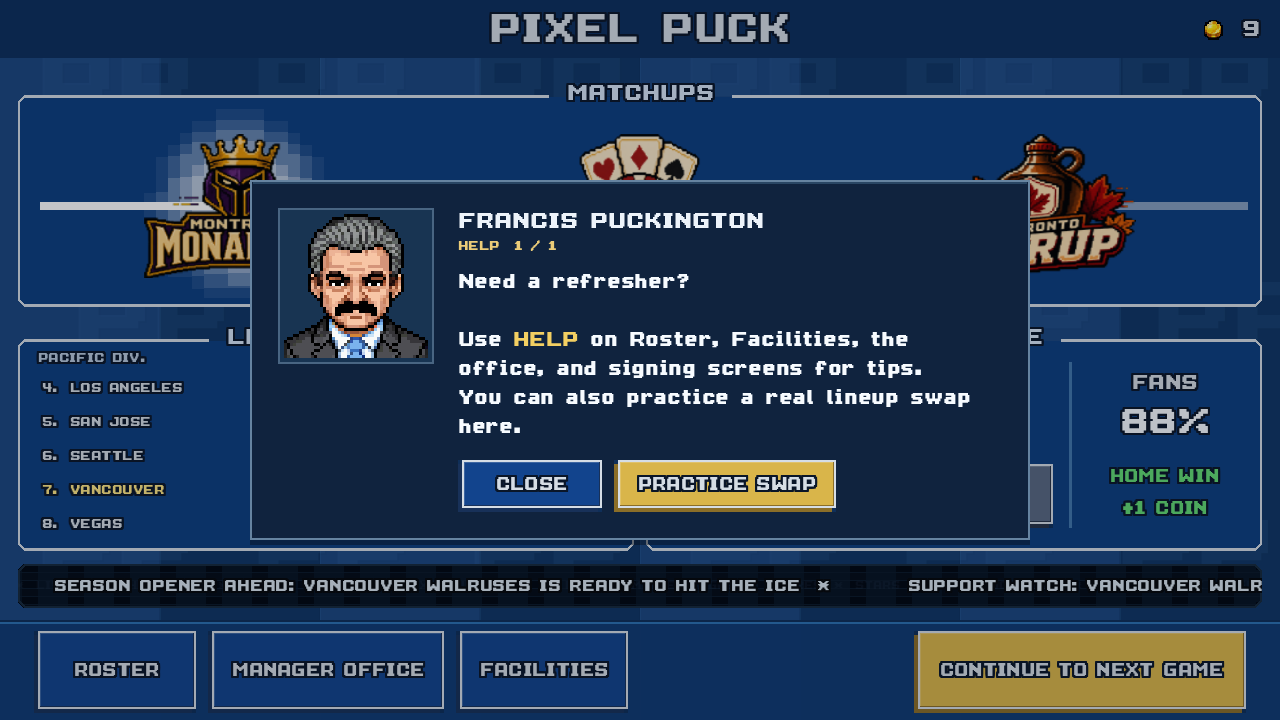
Tap the question mark on Home for club tips and Practice Swap. Roster, Facilities, and the office have tips for their own screens.
Resources
- Press kit
Find PixelPuck facts, screenshots, logos, gameplay footage, current availability, and a contact for coverage.
Release and testing
PixelPuck is in development for iPhone. There is no public App Store release date yet. You can email the developer about future testing opportunities. Android is planned, with no release date announced.
Email about testingOpens your email app.